Software training · AI-assisted experiment
Expense Desk
The idea we couldn’t build at work
I created two expense-review training experiences: one based on the watch-and-practice approach I used in corporate training, and one exploring in-app coaching and adaptive practice.
Practice requires a laptop or desktop.
The work behind the idea
In my corporate software-training work, we packaged demonstrations, Storyline practice simulations, and job aids in Articulate Rise courses. It was a practical format we could deliver with our tools and resources.
Keeping it current and providing enough practice were harder:
- One software change, several learning updates. Demonstrations, job aids, and simulations all needed revision when the interface or workflow changed.
- More practice meant more production. Learners wanted additional practice, but each Storyline scenario took time to build, so a simulation usually offered one decision to practice.
- Sandboxes needed SME-built cases. Subject-matter experts had to set up meaningful cases and rebuild them when software or workflows changed.
We wanted learning support that could keep pace with the software, with more practice than our production process could sustain.
The idea we wanted to explore
At the time, we imagined an in-app coach that could update its walkthroughs alongside the software and generate more cases for learners to practice. AI-assisted development made me want to revisit that idea.
I saw two possibilities: build targeted learning pieces around difficult workflow steps, with varied cases for adaptive practice; and explore whether an AI-enabled application could help update learning when its workflows changed, with human review.
This experiment explores contextual guidance and adaptive practice. Automatic walkthrough and case updates remain a future question.
Version 1 · The familiar format
Watch & Practice
I couldn’t share the corporate courses, so I created Expense Desk for the fictional company Harbor & Pine. Every report, receipt, and policy is invented. Learners inspect evidence, apply policy, choose a decision, and complete the software actions.
The first version recreates the format I used at work: a narrated demonstration, written guide, practice with feedback, and a downloadable job aid.
Version 2 · The experiment
In-app coach
For the second version, I used Claude Code to place guidance inside the application and connect follow-up practice to missed decision types.
The walkthrough leads into practice with optional hints, then independent review. A missed return, adjustment, or escalation decision can add one new case of that type. Each type can trigger one follow-up case.
- WalkthroughStep-by-step guidance
- Practice with hintsHelp on request
- Independent practiceReview on your own
Adaptive practice · Follow-up cases based on missed decision types
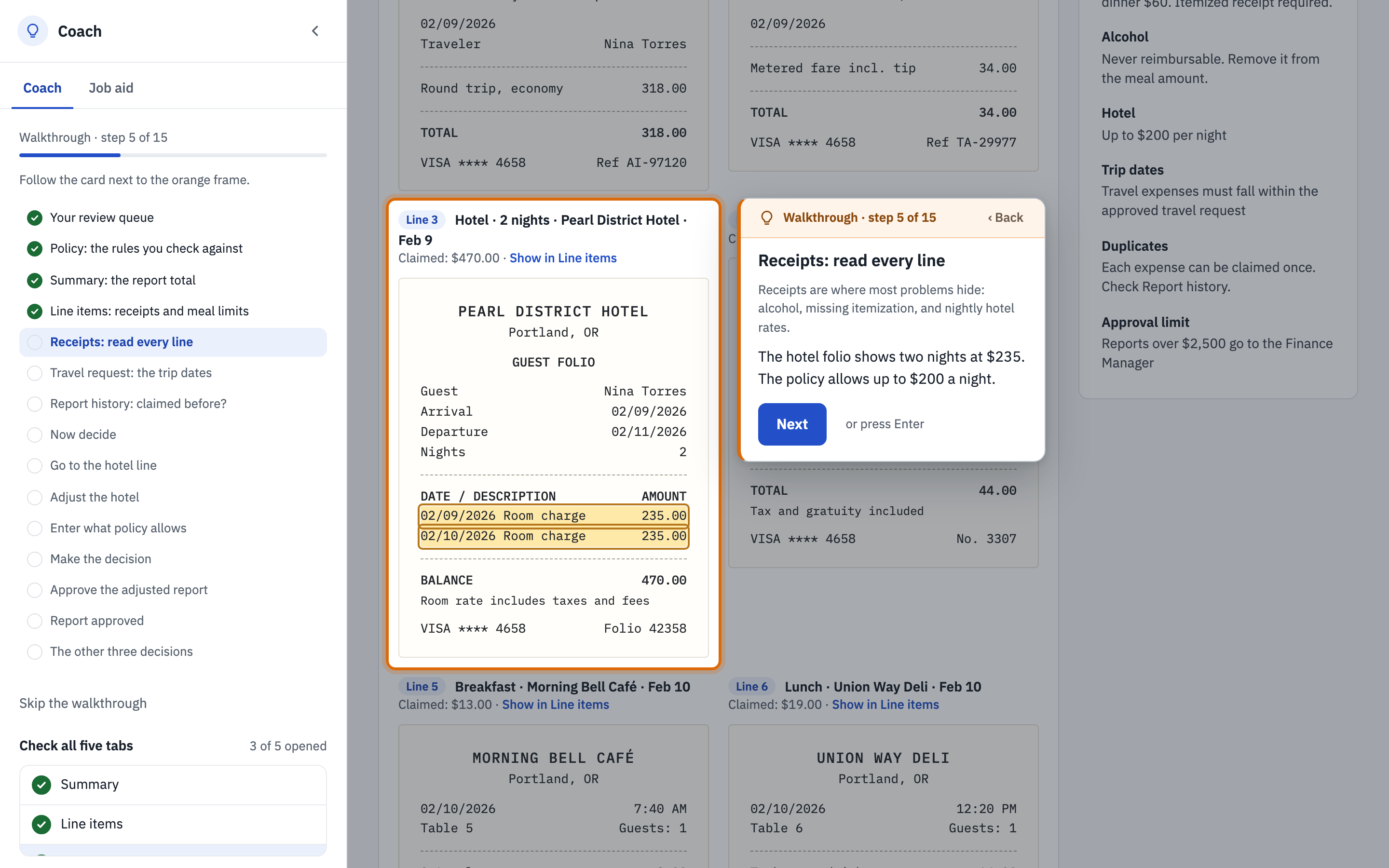
Watch the coach walkthrough 34 seconds · No audio
The coach frames the next control and places instructions beside the work as the learner reviews a report and completes the decision. This preview has no audio.
Read the text walkthrough
- Review the evidence. The coach highlights the policy panel, report total, line items, and receipts. The hotel receipt shows two nights at $235, above the $200 nightly limit.
- Check the context. The learner checks the approved travel dates and report history for expenses that may have already been claimed.
- Make the policy decision. The report is under the approval limit and has the required receipts. The hotel rate needs an adjustment before approval.
- Carry out the decision. The coach guides the learner to adjust the hotel amount to $400, select the rationale, and approve the adjusted report. The report total changes from $929 to $859.
- Continue into practice. The report status changes to “Approved with adjustments.” The coach summarizes the other decision paths and offers a link to start practice.
What I built to explore the idea
Put help beside the work
I moved walkthrough instructions from a side panel to a card beside the relevant control. Support decreases as learners move toward independent practice; policy and job-aid references remain available.
Distinguish judgment from software execution
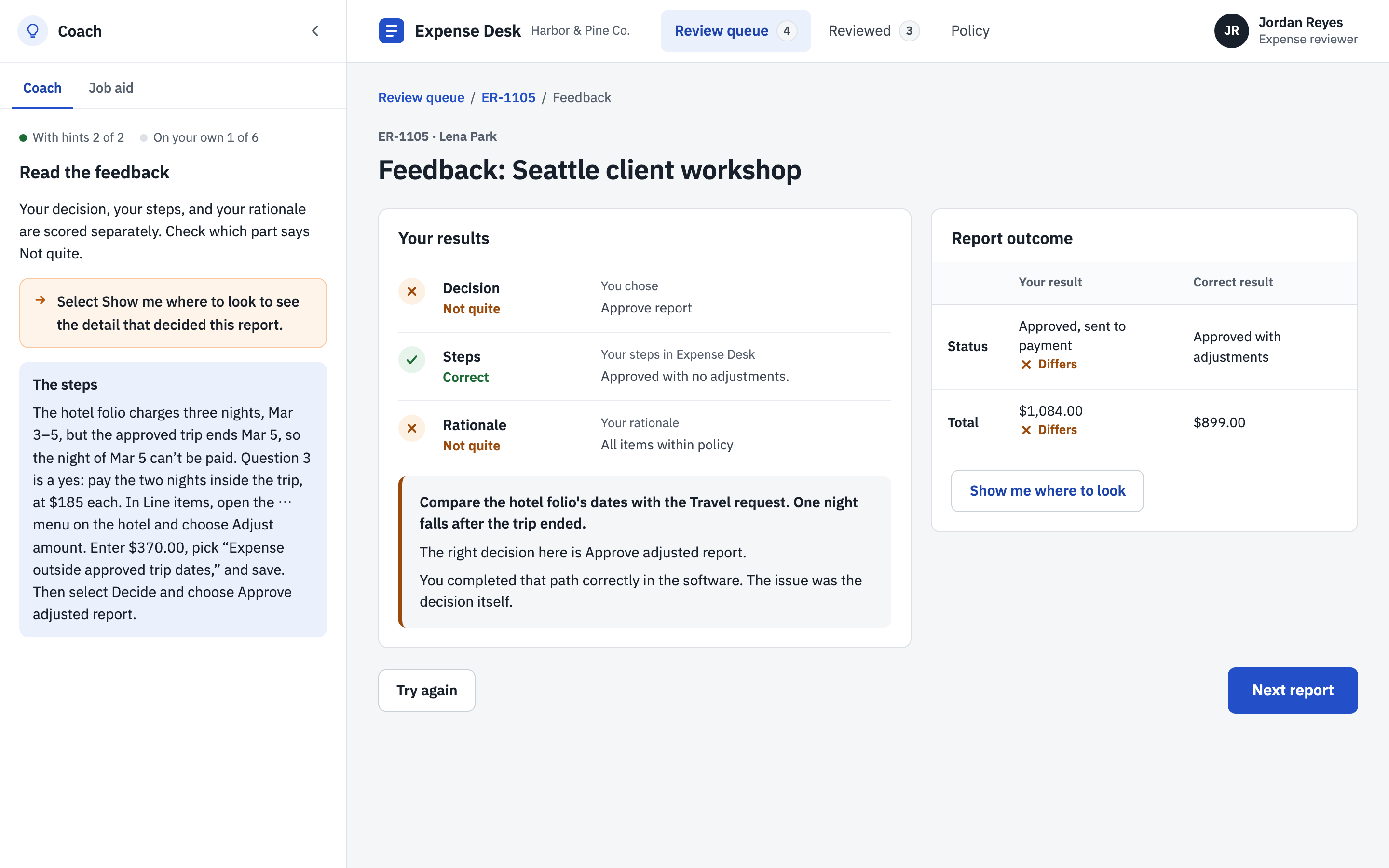
A learner can choose the wrong policy outcome and still carry out that choice correctly in the software. I separated feedback on the decision, software steps, and rationale so those differences stay visible.
Explore a more flexible way to produce training
I built one application that could present multiple practice cases. New reports could use its existing interactions, allowing me to explore how this approach might support additional practice. Whether it reduces overall production or maintenance effort still needs testing.
Where human judgment mattered
AI helped draft cases, write code, and explore alternatives. I set the learning goals and decided how the coach should respond to learners’ actions.
Using a failed test to refine the design: I deliberately submitted incorrect decisions to check what happened next. Testing revealed a gap between the intended learning support and the programmed behavior: some mistakes received feedback but no follow-up case. I revised the rules so each eligible missed decision type received another opportunity to practice, then checked the revised sequence.
| Area | My contribution | AI assistance |
|---|---|---|
| Learning | Defined the steps for checking expense reports, feedback criteria, and rules for follow-up practice | Implemented the interactions and practice logic |
| Content | Checked cases, evidence, scripts, and feedback for accuracy and consistency before approving them | Drafted cases, receipts, and learning materials |
| Experience | Tested mistakes, revised guidance, and chose what to simplify | Built revisions and supported checks |
What I would test next
I do not yet know which version better serves learners. The coach also introduces its own development and maintenance work.
- Learning: compare independent decisions on unfamiliar reports, recurring mistakes, support use, and time alongside accuracy.
- Maintenance: change a workflow in controlled copies, then compare update effort and remaining errors across both versions.
I do not currently have access to real learners. I am considering AI agents that exercise different interaction patterns to find confusing paths and feedback gaps; their behavior would not establish how real people learn.
Reflection
This project let me revisit an idea we’d wanted to try at work but had struggled to explore with our existing tools and resources. Building Expense Desk gave me something I could finally use, test, and change. Some of the most useful changes came from making mistakes on purpose and seeing how the coach responded. I now have two working versions to compare, and I’d like to see what happens when other people try them.